
Overview
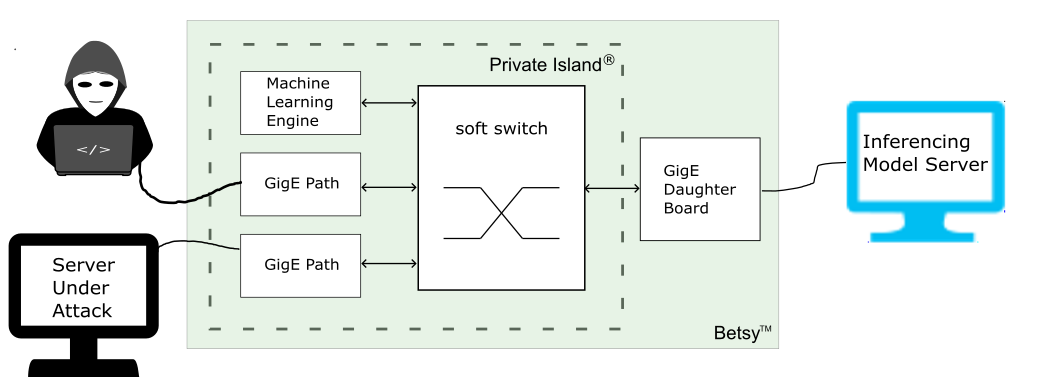
This article summarizes the use of the Private Island ® open source FPGA project and a Betsy™ maker board to implement real-time, network-based inferencing utilizing a networked model server (see figure below).
The applications are research, experimentation, and real-time deployment to thwart intrusion attacks and spying on small business and home networks.
This article describes the use of the OpenVino toolkit and model server using a KServe REST API. However, other model servers can also be supported.
Development Flow
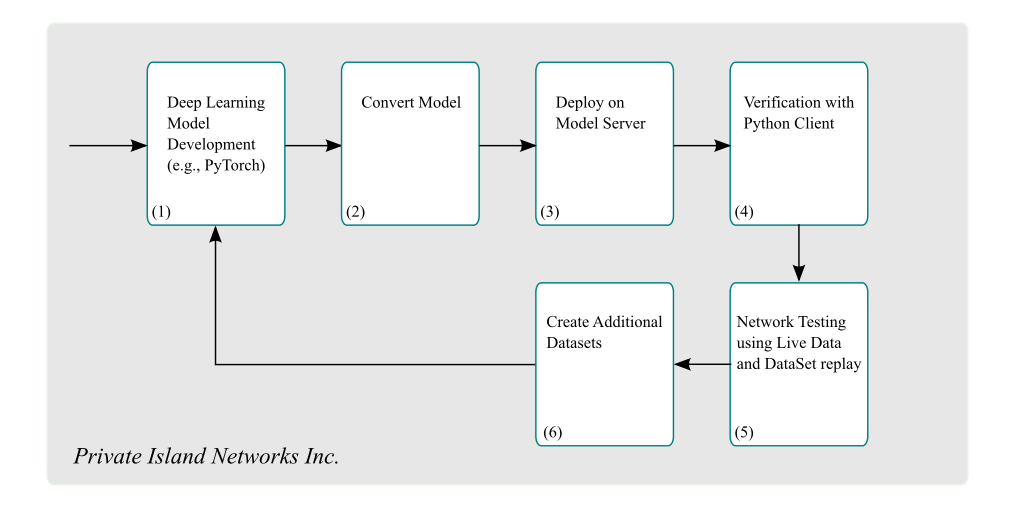
The figure below shows steps for model development, deployment, and testing.
Development & Deployment Steps:
- Develop a Deep Learning Model using PyTorch. Start with simple but meaningful datasets.
- Convert Deep Learning Model to a representation that can be served
- Deploy Model on Server that supports a real-time inferencing API
- Use a Python Client to verify that the Model Server is performing as expected.
- Customize the Private Island Machine Learning Framework as needed to receive, process, and transmit input vectors according to model requirements
- Iterate by creating additional datasets and Deep Learning model network topologies.
Create a Deep Learning Model
We currently use Pytorch for development of Deep Learning (neural network) models. We make use of Pytorch inside a Python virtual environment:
$ python3 -m venv ml_venv

$ source ml_venv/bin/activate

$ pip install torch
Collecting torch
...

# install other needed Python libraries for running examples
$ pip install numpy
$ pip install openvino
$ pip install matplotlib
$ pip install scikit-learn
$ pip install PyQt6  # On Ubuntu 24.04 Linux

(ml_venv)$ python3 -c "import torch; print(torch.__version__)"
2.13.0cu130
Below we clone the examples used in this article from our Git Server.
$ git clone https://privateisland.tech/repos/cgit.cgi/ml_models
An excellent PyTorch primer for the development of a basic Multi-Layer Perceptron from scratch is is provided at Building a Simple MLP from Scratch Using PyTorch.
Ultimately, we want to create a PyTorch model that can be converted to an OpenVino Intermediate Representation (IR). Therefore, we'll rewrite the initial example using higher layer PyTorch constructs, so OpenVino can recognize and convert our model.
Convert our Deep Learning Model
In order to serve our MLP model on our model server, we must first convert it into an OpenVino Intermediate Representation (IR).
These steps are provided in mlp_2.py and are shown below. For further information on the OV functions, refer to the OV Python API
    ov_input=(ov.PartialShape([1, 2]), ov.Type.f32)
    ov_model = ov.convert_model(model, input=ov_input)
    compiled_model = ov.compile_model(ov_model, "AUTO")
    ov.save_model(ov_model,'./mlp.xml')
Deploy on Model Server
The OpenVino Model Server (OVMS) is hosted on Github.
Refer to the OpenVINO™ Model Server Developer Guide and Building OpenVino from source
We chose the "Building Binary Package" option for Ubuntu 24.04 Linux:
$ make targz_package PYTHON_DISABLE=1
$ tar xvzf dist/ubuntu24/ovms.tar.gz
Set environment variables:
export LD_LIBRARY_PATH=$BUILD_DIR/ovms/lib
export PATH=$PATH:$BUILD_DIR/ovms/bin
Set up our model folder:
$ tree models/mlp
models/mlp
└── 1
    ├── mlp.bin
    └── mlp.xml
To serve our MLP model with OVM:
ovms --log_level DEBUG --rest_port 9000 --rest_bind_address 127.0.0.1 --model_name mlp --model_path models/mlp
...
[serving][info][model.cpp:97] Updated default version for model: mlp, to: 1
[serving][info][servablemanagermodule.cpp:55] ServableManagerModule started
[modelmanager][info][modelmanager.cpp:1048] Started model manager thread
[modelmanager][info][modelmanager.cpp:1067] Started cleaner thread
Verification with Python Client
Our client to perform HTTP-based inference is based off the Python client example for a Triton Inference Server and also the OVMS HTTP sample clients: KServe API usage samples. As previously mentioned, we utilize the KServe REST API to interface with OVMS.
A Python script to infer the previously described MLP model is also provided on the Git Server: http_infer_mlp.py.
$ python http_infer_mlp.py --http_port 9000 --input_name x --output_name x.13 --model_name mlp

Network Testing
The Private Island project supports a Machine Learning Framework to create and transmit input vectors in real-time to a remote inference server.
An example will be added here explaining the customizations required for an example application.
Create Additional Datasets
To Be Added


