
Overview
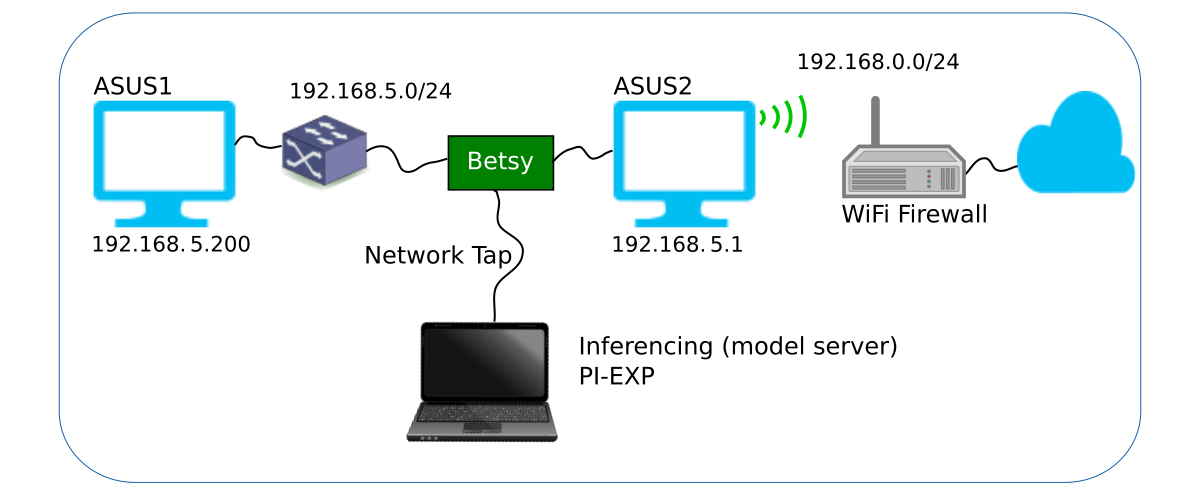
This article describes the ongoing machine learning exploraton and experimentation with Flagler College students at our location using an experimental network, which is shown in Figure 1 below.
From left to right:
- ASUS1: Boots as either Linux or Windows and is used to launch network attacks.
- Gigabit Ethernet Switch that will support additional nodes (e.g., camearas and IoT gadgets) on the same network as ASUS1.
- A three Gigabit Ethernet Betsy™ Maker board acting as a transparent network tap and machine learning preprocessor.
- ASUS2: Ubuntu 24.04 Linux Server under attack. Server is multi-homed with one CU GigE interface and one WiFi interface.
- WiFi Firewall: Provides Internet access and segments experimental network from other local network resources.
- Cloud: Internet
- Laptop: Executes a deep learning model server for inferencing, PI-EXP for monitoring and control of Betsy, and other network monitoring software, such as Wireshark.
ASUS1 Linux Setup
The following sofware is installed on ASUS1 using a Python virtual environment:
$ sudo apt install python3.12-venv
$ sudo apt install nmap
$ sudo apt install bettercap
$ sudo apt install apache2-utils
$ sudo apt install wrk
$ sudo apt install hping3
$ source /opt/bin/activate
$ pip install scapy
$ pip install hping3
Initial Testing and Results
To Be Added.


