Set up Altera USB Blaster II on Ubuntu Linux?
Aug 30, 2025
asked by anonymous
Question / Issue:
Quartus Signal Tap and Programmer can't find my USB Blaster on Ubuntu Linux 24.04. How do I set it up?
share


subscribe to mailing list:
Responses:
Date: Aug. 30, 2025
Author: Private Island Networks
Comment:
You should have a udev rule for it under /etc/udev/rules.d/
Refer to the man page for information on where rules are located and how they are processed: https://man7.org/linux/man-pages/man7/udev.7.html
From a terminal, determine the Vendor and Device ID for your USB Blaster:
$ lsusb | grep -i altera
Bus 001 Device 010: ID 09fb:6010 Altera USB-BlasterII
Next, add this information to your USB rules file. If you don't already have it, create one:
$ sudo vi /etc/udev/rules.d/92-usb.rules
SUBSYSTEM=="usb", ATTRS{idVendor}=="09fb", ATTRS{idProduct}=="6010", MODE="0666"
The final step is to either restart the udev service or reboot your PC. The latter is recommended.
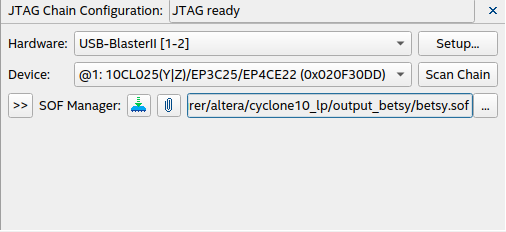
Once you have completed the steps above, you should see something similar as shown in the attached Signal Tap screenshot.